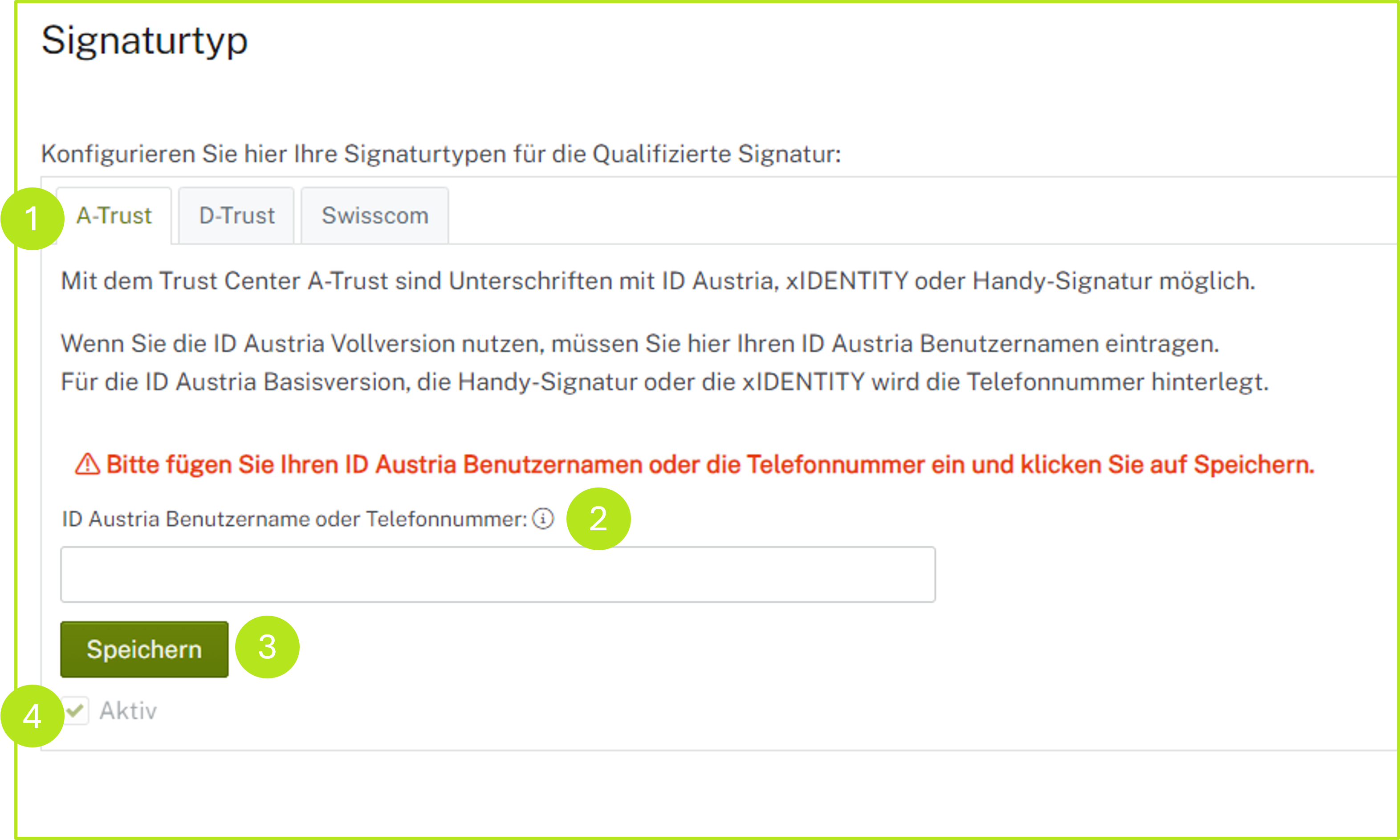
The username or phone number for signature types according to A-Trust can be stored in the MOXIS settings under Signature type > A-Trust tab (see Figure 1 [1]).
XiTip
If you save the user name or telephone number, this has the advantage that this data is already filled in on the A-Trust login screen during the signing process. However, this field cannot be changed manually during the signing process. If the user name or telephone number is not saved, you have to enter all login data by hand.
1. Setting up A-Trust signature types in MOXIS 4.52
The signature types for the qualified signature are configured in this tab (see figure 1 [1]). Two options (see figure 1 [2]) are available for this:
Enter the ID Austria user name for the signature type:
-
ID Austria with full function
Enter the telephone number for the signature type:
-
ID Austria with basic function
-
Mobile phone signature
-
xIDENTITY
To complete the process, tick the Active checkbox (see figure 1 [4]) and click the [Save]-button (see figure 1 [3]) to finish the setup.